
URL Fragment Text Directive
Let’s say you want to share a specific section of a long webpage with someone. Nowadays, navigation is vastly improved and we can rely on sections with anchors (eg.: https://example.com/page#my-section). This is usually done with an HTML element containing an ID tag:
<h1 id="section-1">Section 1 title</h1>
<p>contents...</p>

<h1 id="section-2">Section 2 title</h1>
<p>more contents...</p>
On this example, if you give anyone else the link https://example.com/page#section-2, the browser will jump directly to the element, so you see it immediately, regardless the position of the element in the page. This technique is known as deep-linking. This technique is however fully dependent on the webmaster or editor to implement it.
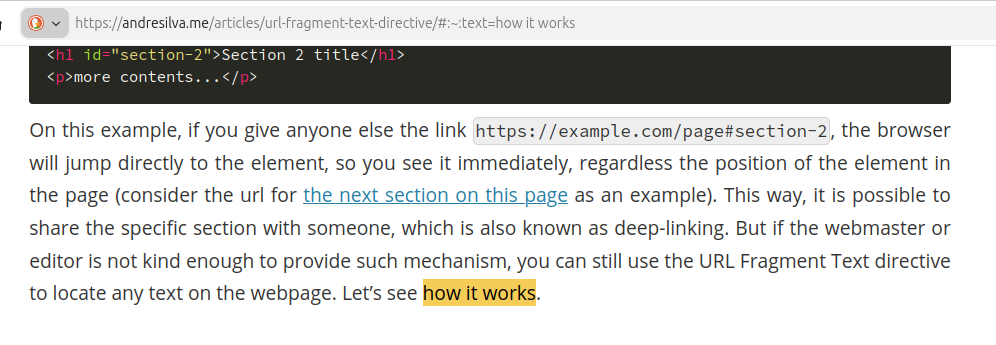
If the website owners were not kind enough to provide such mechanism, you can still use the URL Fragment Text Directive to locate any text on the webpage. Let’s see how it works.
The Text Directive
The Text Directive, also known as “Scroll to text fragment”, was introduced about 2020. Although still being a draft and not yet a W3C standard, it can be used with the major moder browsers, mobile included. It consists on the following parts:
/page#:~:text=snippet
pageis the resource page you are accessing to#is the start of URL Fragment, which you can also use for the anchors, as seen above:~:is the specific syntax for the Scroll to text fragment functionality starttext=snippetinstructs the browser to locate and highlight the first instance ofsnippeton the current page
You can include one or more words. Take this link to search for “more words” on this page. You can see that the browser will locate the text and highlight it. The browser will locate the first instance of the text “more words” and highlight it. Notice that on this paragraph only the first instance is highlighted when you click the link. Now this is independent of page owners to implement it or not, since this works out of the box right from your browser (given you’re using a supported one).
Examples
You are not limited to search for a fixed text. In fact, you can search for text that starts with a given prefix and/or suffix, or even combine multiple text directives. See the table for examples:
The quick brown fox jumps over the lazy dog
| Syntax (click for live example) | Locates first instance of |
|---|---|
| #:~:text=dog | Exact text “dog” |
| #:~:text=quick,fox | Text range which starts with “quick” and ends with “fox” |
| #:~:text=over-,the | Text “the” if it is preceded by prefix “over” (notice only the second “the” is highlighted as it is the only preceded with “over”; prefix contains a dash - after) |
| #:~:text=the,-quick | Text “the” if it is succeeded by suffix “quick” (notice only the first “the” is highlighted as it is the only succeeded with “quick”; suffix contains a dash - before) |
| #:~:text=jumps-,over,-the | Text “over” if it is both preceded by prefix “jumps” and suffix “the” |
| #:~:text=jumps,-over&text=lazy | Both “jump” and “lazy” independently. This way you can perform searches for multiple expressions separated with & using any of the syntaxes above; all matches will be highlighted individually |
As you can see, this functionality is a powerful way for locating a portion of text on a page and share it along the URL. The person who opens the link will see the exact section directly (no more screenshots or asking “locate for X on page manually”).
In fact, you don’t need to create your own expressions manually to share simple highlights. If you use Chrome, you can select the text you want and use the context menu option “Copy link to highlight”. This works on both computer and mobile. For Firefox on desktop, you also have a similar context menu option.
Customize behavior with CSS
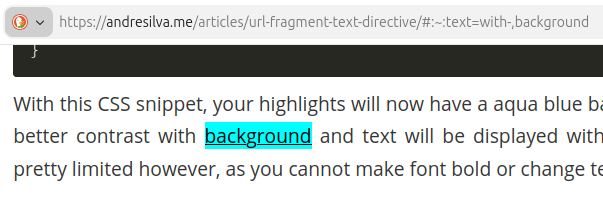
If you are a webmaster, it is possible to perform a bit of customization to better integrate the highlight functionality with the page. You can use the pseudo-selector ::target-text to customize some properties. Example:
::target-text {
  background-color: aqua;
  color: black;
  text-decoration: underline;
}
With this CSS snippet, your highlights will now have a aqua blue background, text color will be black for better contrast with background and text will be displayed with an underline. The properties set is pretty limited however, as you cannot make font bold or change text size, for example.
Privacy and security considerations
Although you can customize this functionality with CSS, it is not possible to access it with JavaScript. This is because although JavaScript can access to the URL Fragment through window.location object, the portion referring to the Text Directive is not available. If allowed, client side JavaScript code could be used to exfiltrate shared snippets to remote search, potentially violating user privacy. This way the text search expression is only seen by the browser/user-agent.
Explore more
I hope you enjoyed the article and it was informative for you. But as usual, it is not possible to cover every detail within a short article, so I give you more resources to proceed with your own research if you like:
URL Fragment Text Directives draft specification